Shopify vs
WooCommerce
WooCommerce
Which is better, Shopify or WooCommerce? Cost, hosting, checkout, catalog limits, and SEO compared, with a verdict for your store.
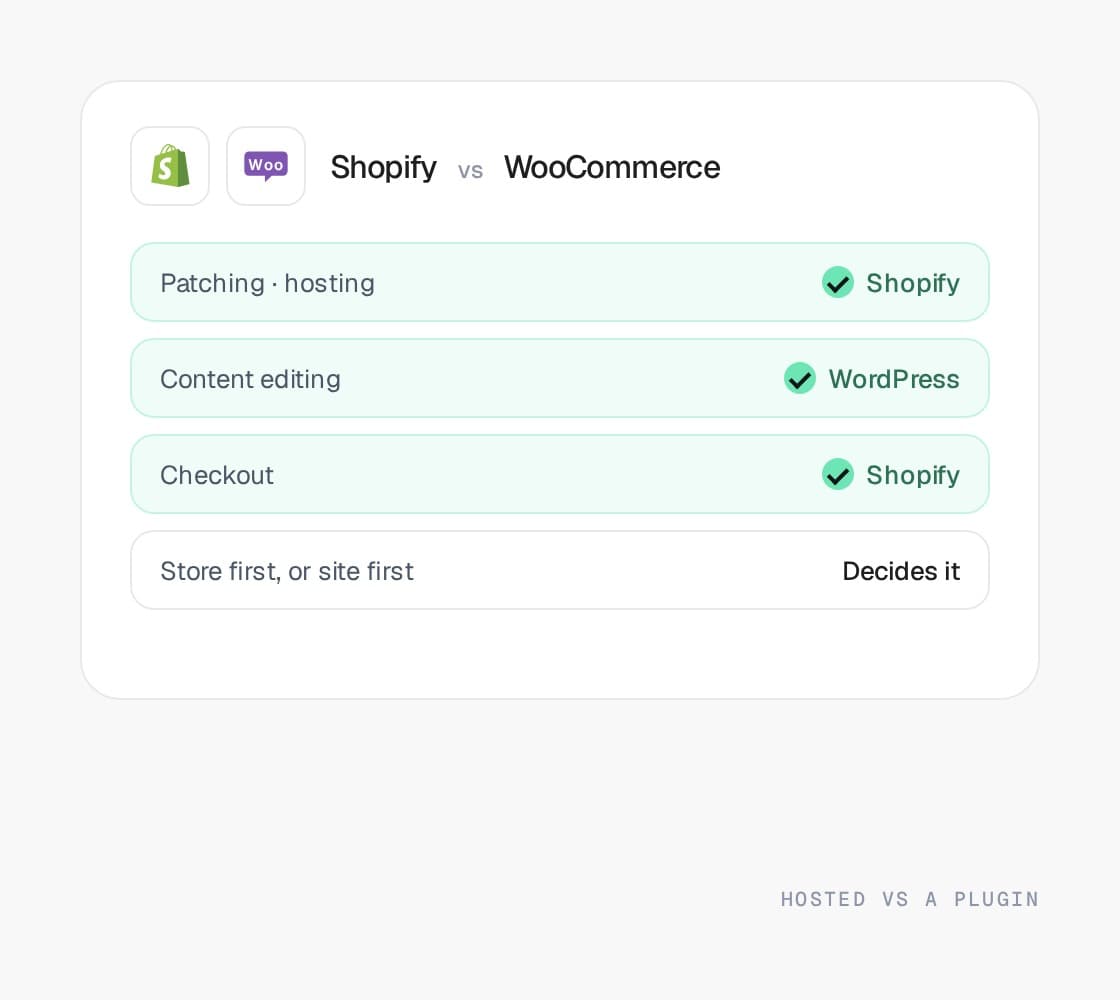







The short answer
Pick one.
Here's when.
Pick one.
Here's when.
Pick Shopify when
The store is the business. You want checkout, hosting, PCI, and patching to be somebody else’s job, and most of what you built with plugins exists as a platform feature or a mature app.
Pick WooCommerce when
The content site is the business and the store is a sideline, the catalog is small, a team maintains WordPress anyway, and you want to own every layer.
The tiebreaker
The plugin count. Past a dozen plugins that each touch checkout, shipping, or payments, WooCommerce stops being cheap and starts being a maintenance job, and the move to Shopify pays for itself in hours not spent.
Row by row
Same criteria.
Both columns.
Same criteria.
Both columns.
Every comparison on this site uses the same eleven criteria, and each platform is described in the same words wherever it appears. The last column is the only opinion on the page.
Pricing model
How do you pay for the platform, and what grows with you?
Shopify
Subscription plus processing
A monthly subscription by plan, plus payment processing. Using a gateway other than Shopify Payments adds a per-order platform fee.
WooCommerce
Free plugin, paid everything else
A free WordPress plugin. You pay for hosting, the theme, a license for most of the plugins that make it a store, and processing.
Our read
WooCommerce looks free until you add hosting, licenses, and the developer who handles updates. Shopify’s bill is visible up front.
Catalog and variants
How deep can the catalog go before something has to be split?
Shopify
Option and variant ceilings
Products, options, and variants, with ceilings on both. Deep configurables get split into duplicates or modeled with metafields and apps.
WooCommerce
Fine in the thousands
Simple and variable products with attributes. Works in the thousands; large catalogs strain search, filtering, and the database without extra plugins and hosting.
Our read
Even at a few thousand SKUs. Past that, Shopify holds and WooCommerce needs plugins, a better host, and patience.
B2B and pricing logic
Company accounts, price lists, quotes, and where the price lives.
Shopify
Not on standard plans
Wholesale runs as a password-protected storefront, an app, or draft orders until you move to Plus.
WooCommerce
Plugins, each with limits
Wholesale pricing, quotes, and customer roles are each a plugin with its own limits and update schedule.
Our read
Neither is a B2B platform on its own. Plus gets there natively; WooCommerce gets there with plugins.
Checkout control
How much of checkout can you change, and who tests it?
Shopify
Branding only
Script tags and template edits are gone; anything that changes the flow needs Plus.
WooCommerce
Anything, until an update
Fully customizable through plugins and code, which is also why an update can break it. PCI scope and fraud tooling are yours.
Our read
Shopify’s converts out of the box and cannot be broken by an app. WooCommerce’s can be anything, including down after an update.
Hosting and patching
Who owns the servers, the patches, and the upgrades?
Shopify
Hosted and patched for you
You own the theme and the app stack, nothing underneath.
WooCommerce
You host and patch it all
You host it, patch WordPress, the theme, and every plugin, and keep the backups. The store is as reliable as its least maintained plugin.
Our read
The whole difference. Shopify patches itself; WooCommerce is patched by whoever remembers.
ERP and integrations
What the APIs give you, and where the middleware starts.
Shopify
Rate-limited APIs, many connectors
Admin API, GraphQL, webhooks, and a large connector market. Rate limits shape how bulk syncs have to be built.
WooCommerce
A REST API and plugins
A REST API and a plugin for most connectors. ERP integrations are usually a plugin plus custom work, and quality varies.
Our read
Shopify’s API and connector market are deeper. WooCommerce integrations are plugins of varying quality.
Apps and talent
How big the app and agency pool is, and where.
Shopify
The largest in commerce
The largest app store, agency pool, and hiring market in commerce. Most needs have an app; each one is a script and a monthly bill.
WooCommerce
Largest on the web, most attacked
The largest plugin ecosystem on the web and the most attacked. Plenty of developers; few who specialize in commerce at scale.
Our read
Both are huge. Shopify’s is commerce-specific; WordPress’s is general, which is why the security scanner is a plugin too.
Frontend and speed
What the storefront is built with, and how fast it is by default.
Shopify
Liquid themes, fast by default
Liquid themes on Online Store 2.0, served from Shopify’s CDN. Fast when the theme and app scripts are disciplined; Hydrogen for headless.
WooCommerce
Any theme, cache-dependent speed
Any WordPress theme, with speed depending on the host, the cache, and the plugin stack cooperating. WordPress remains the best content editor here.
Our read
Shopify is fast by default and gets slow with app scripts. WooCommerce is fast only when host, theme, and cache cooperate.
SEO and URLs
How much of the URL structure you control, and the platform habits to manage.
Shopify
Fixed paths, duplicate collections
A fixed URL structure (/products, /collections) and duplicate collection paths to canonicalize. Metadata and structured data are yours to control.
WooCommerce
Full URL control, best publishing
Full URL control and the strongest publishing tools of any option, with mature metadata plugins. Speed is the usual weakness.
Our read
WordPress wins on content and URL control; Shopify wins on speed and stability. Many merchants keep WordPress for the blog and move the store.
Multi-store and international
Several brands, regions, or currencies under one admin.
Shopify
Markets on one store
Markets handles currency and language on one store. Separate catalogs mean separate stores, synced by app or middleware.
WooCommerce
Plugin territory
Multisite and multi-currency are plugin territory. Workable for a second storefront, painful past that.
Our read
Markets handles currency and language natively. WooCommerce needs plugins for both.
Who it fits
The merchant this platform is genuinely the right answer for.
Shopify
DTC, list pricing, thousands of SKUs
DTC brands with list pricing and a catalog in the thousands that would rather ship than patch.
WooCommerce
Content-led, small store
Content-led brands where the site is the business and the store is small, or anyone who wants to own every layer and has a team to maintain it.
Our read
Store-first brands to Shopify. Content-first sites with a small store can stay.
Results
Show you the money.
- View case study: Evelyn & Arthur case study

DTC · Shopify Plus
+34%
AOV
An established apparel brand replatformed to Shopify Plus without losing a single SKU or SEO ranking, and lifting average order value in the process.
Read case study 

DTC · Shopify Plus
2.4x
faster page loads · zero SEO loss
Replatformed an aging custom site to Shopify Plus without losing a single SKU or SEO ranking.
The big numbers
+30%
Avg. conversion rate lift within 12 months
+50%
Avg. order value lift
<1s
Page load speeds on the storefronts we build
+15%
Avg. revenue lift within 6 months
THE QUESTIONS YOU HAVE -
Get them out
of the way.
of the way.
Where to next
The pages behind
the verdict.
the verdict.
Each platform compared here has its own page, and the move between them is written up as a plan, in the direction merchants actually make it.
Migration plans
Other comparisons
- Read the Shopify vs BigCommerce comparisonLearn more
Shopify vs BigCommerce
Two hosted platforms that convert well. One app, one fee, and the multi-storefront model usually decide it.
- Read the Shopify Plus vs Shopify comparisonPlusLearn more
Shopify Plus vs Shopify
Same storefront, different contract. Checkout, wholesale, and multiple stores are the reasons to step up.
- Read the Magento vs Shopify comparisonPlusLearn more
Magento vs Shopify
Depth against convenience. Where the price lives decides it more than anything else on the page.
- Read the BigCommerce vs Magento comparisonLearn more
BigCommerce vs Magento
Open SaaS against open source. B2B Edition carries a straightforward wholesale operation; the B2B module carries the rest.
- Read the Magento vs WooCommerce comparisonLearn more
Magento vs WooCommerce
Both open source, both yours to host. One is a commerce platform, the other is a blog with a store attached.
- Read the Salesforce Commerce Cloud vs Shopify comparisonPlusLearn more
Salesforce Commerce Cloud vs Shopify
Revenue share against a subscription. The one-estate case decides it, and it holds less often than it used to.
- Read the Shopware vs Shopify comparisonLearn more
Shopware vs Shopify
Open source against hosted. Geography and who owns the upgrades decide it.
- Read the Shopware vs Magento comparisonLearn more
Shopware vs Magento
Two open source PHP platforms. Depth against weight, and which continent your buyers are on.
- Read the Best ecommerce platform for B2B comparisonPlusLearn more
Best ecommerce platform for B2B
Ranked by where the price lives, how deep the catalog is, and who maintains it. The answer changes with each.
Free platform audit
Deciding?
Start here.
Start here.
Five business days, a senior engineer and a strategist, and a document you keep: what your store runs on, where the price lives, how deep the catalog is, which customizations would survive a move, and a straight recommendation.
The cost of staying is set against the cost of moving, on your numbers rather than a vendor’s. If the answer is stay put, that is what it says.